

- Home
- Case studies
- The Mortgage Panel
Building both sides of a modern brokerage.
From search and digital acquisition to private AI operations.
For The Mortgage Panel, Sigma Labs engineered a connected technology environment spanning the practice's public website, AI engagement, BrokerEngine, Microsoft 365, document intelligence, workflow automation and human-approved AI agents. The practice calls its operations assistant Mia. The name and identity belong to the practice; the architecture underneath is Sigma Labs'.
reviewed
Filing, finding and following up was consuming the week.
The Mortgage Panel, run by Lloyd Raphael, manages 406 client files, 792 deals and 36 lenders. The practice is a willing reference on request, and its public website is at themortgagepanel.com.au.
Every loan application generates a large volume of identity documents, payslips, bank statements, contracts and lender correspondence. Most of it arrives by email, out of order and under whatever filename the sender chose.
All of it lives in the practice's own Microsoft 365 tenant, and it has to stay there. Any assistant had to work inside that boundary, under an identity the practice controls, rather than copy client documents anywhere else.
Filing those documents, finding information when a lender or client asked for it and keeping clients updated was consuming most of a personal assistant's week. The practice did not need another chatbot. It needed the administrative layer of the business to run itself, with a person still in control of anything that mattered.
It also needed to win clients. The practice's public website had to be found for the right searches, answer real questions, and hand a ready client to the broker with the details already in the CRM, in a sector where every claim, disclosure and form is subject to compliance review.
We engineered both sides of the practice.
Most vendors own part of the stack. A web agency understands the website. An AI automation agency understands a model and a trigger. A managed service provider understands infrastructure and support. This engagement needed all of it to work as one environment.
Sigma Labs designed and built the client-acquisition layer, the public platform that finds, informs and qualifies a customer and hands them to the broker, and the business-operations layer, the private AI assistant and specialist agents that do the practice's document, email, contract, research and reporting work under human approval. Both run against the same Microsoft 365 tenant, the same CRM and the same security boundaries.
- Search-focused public website
- Service and location pages, guides, Q&A
- Mortgage calculators
- Public AI assistant
- Structured lead capture with consent
- BrokerEngine and Microsoft 365 integration
- Follow-up task creation
- Mia, the private AI operations assistant
- Inbox and document intelligence
- Contract review
- Lender intelligence
- Reporting
- Nine specialist agents
- Approval gates and an operations console
A public website engineered to hand the customer to the broker, not to a contact form.
The Mortgage Panel's public website was developed with strong emphasis on technical SEO, performance, security, accessibility, conversion and compliance-aware content, and it is integrated into the operations side rather than sitting beside it.
Search, content, tools, assistant, lead flow.
Every part exists to move a visitor one step closer to a conversation with a licensed broker, with the details already captured.
- Search-focused website architecture with mortgage service pages
- Location pages where they genuinely serve a search
- Educational guides and question-and-answer content
- Seven calculators: borrowing capacity, repayments, stamp duty, LVR, refinance, negative gearing and capital gains tax
- Conversion pathways designed around the visitor's stage
- A public AI assistant for general questions and guidance
- Structured lead capture with explicit consent
- BrokerEngine integration for the lead record
- Microsoft 365 integration for the operational process
- Follow-up task creation for the broker
- Search
- Content and calculators
- AI assistant
- Consent
- Structured lead
- BrokerEngine
- Microsoft 365
- Follow-up task
- Broker
The public assistant answers general questions, guides visitors, and gathers details only when a visitor chooses to proceed. It turns that conversation into structured lead data, pushes the lead into BrokerEngine, passes the relevant data into the Microsoft 365 operational process and supports the follow-up task. Personalised credit advice belongs with the licensed broker, and the platform is designed and worded to keep that line clear.

themortgagepanel.com.au, captured 8 Sep 2026. Visitors choose an intent before they read anything else.

A service page built for one search intent, with the calculator and assistant one click away.

A location page that speaks to local lending conditions rather than repeating the home page.

Guides and a question-and-answer library give the site something useful to say for the searches that come before a broker is chosen.
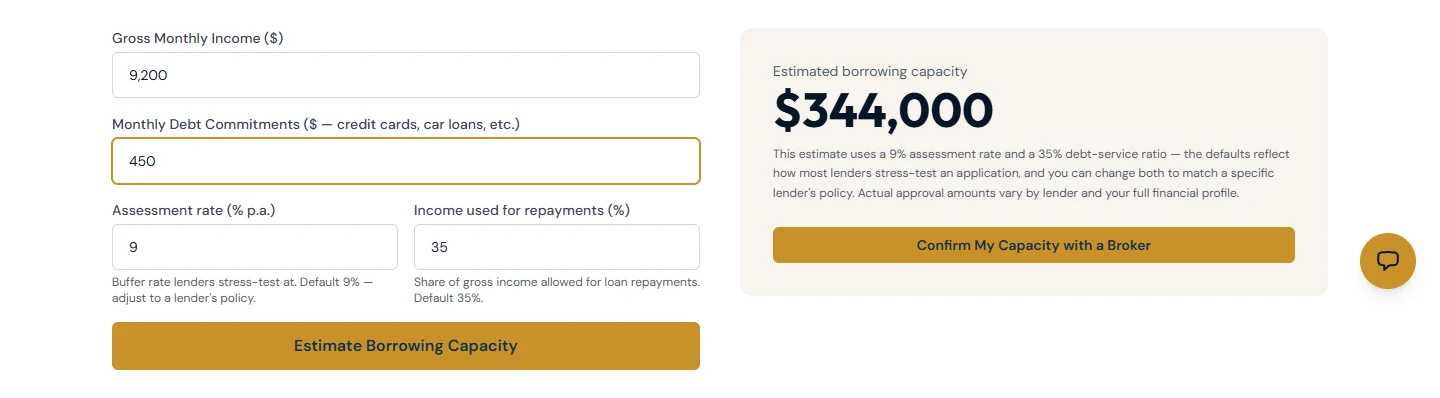
The borrowing capacity calculator with sample inputs. The estimate is general information, stress-tested the way lenders assess it, and hands off to a broker to confirm.
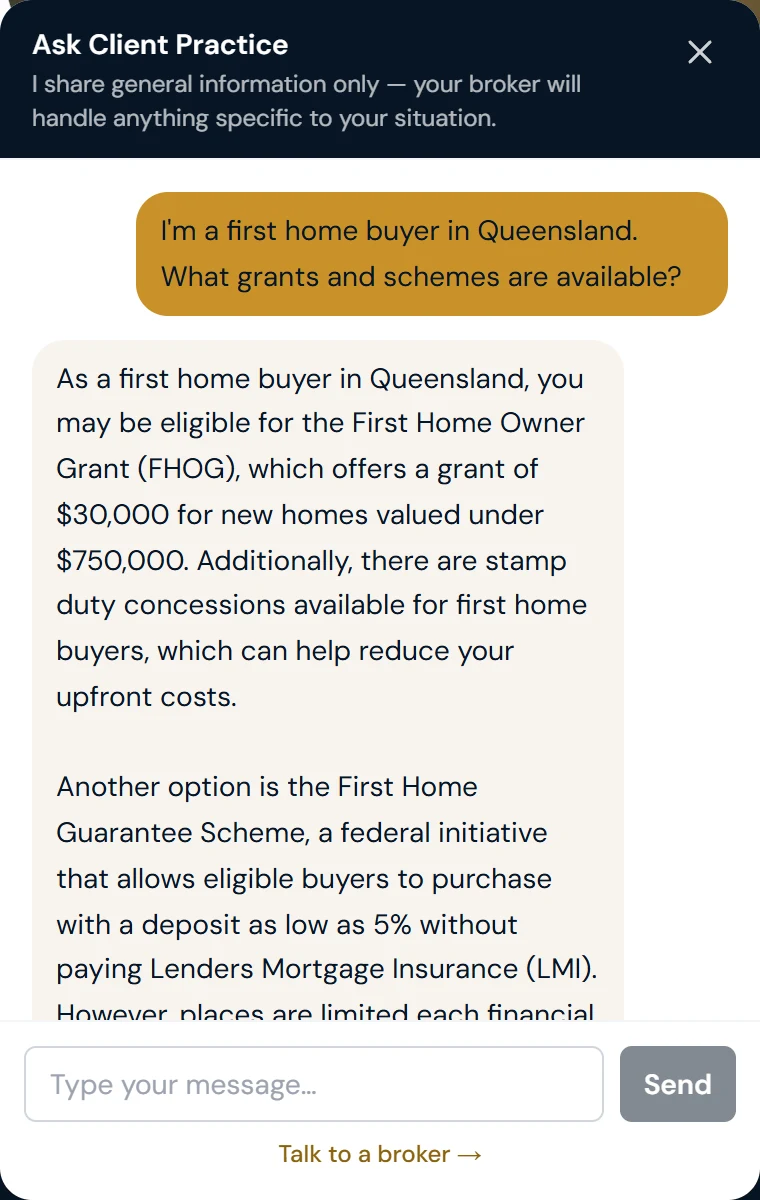
The public assistant answering a general question. It states its limits up front, cites the schemes a first home buyer should ask about, and offers a handoff rather than advice. The brokerage name is replaced in this capture.
Placeholder: the structured lead as it lands in BrokerEngine and Microsoft 365, redacted.
Reviewed by AFG Compliance. Approved for use.
Financial-services platforms cannot be treated like ordinary marketing sites. They need appropriate attention to advertising claims, customer disclosures, privacy and consent, web forms, AI and question-and-answer content, regulated terminology, lead capture, content accuracy, ongoing review, security, accessibility and user experience.
The Mortgage Panel website was reviewed by AFG Compliance and approved for use. The approval specifically required the brokerage to continue using Sigma Labs as its provider and to have the platform reviewed regularly.
That is a review of The Mortgage Panel's website, not a certification of Sigma Labs, and it does not make compliance a guarantee. What it shows is that the platform was engineered and worded with the regulated context in mind, and that a compliance function saw ongoing Sigma Labs review as part of keeping it that way. Regulated figures and scheme names on the site are held in one fact model with a source and a verification date, so a change is made once and reviewed rather than hunted across pages.
The approval's condition is also the service model: periodic content review, support for regulatory-content review, technical SEO and security checks, dependency updates, form and integration testing and AI-knowledge review. Sigma Labs maintains the technology and supports controlled content governance; the brokerage's compliance obligations remain its own. How platform governance works.
Mia: a private AI operations assistant inside the practice's own environment.
Sigma Labs designed and engineered Mia, the practice's private AI operations assistant, integrated into the brokerage's working environment: its mailboxes, document libraries, client records and lender information.
Mia communicates through a branded web console, Telegram messaging and a morning brief, with a WhatsApp channel in progress. Behind those interfaces it coordinates nine specialist agents, each scoped to a single job: inbox, filing, correspondence, lending research, proposals, income analysis, serviceability, diary and contract review. On this page they are grouped into the six jobs the practice actually sees.
The AI is the visible part. The larger part of the work was architecture: the identity Mia acts under, the permission boundaries around the documents, the approval gates, the audit trail and the console that shows what it is doing and what it costs.
Mia's name, voice and interfaces are specific to The Mortgage Panel. The architecture, agent orchestration, security boundaries and approval controls underneath are Sigma Labs engineering, shaped around each organisation we work with.
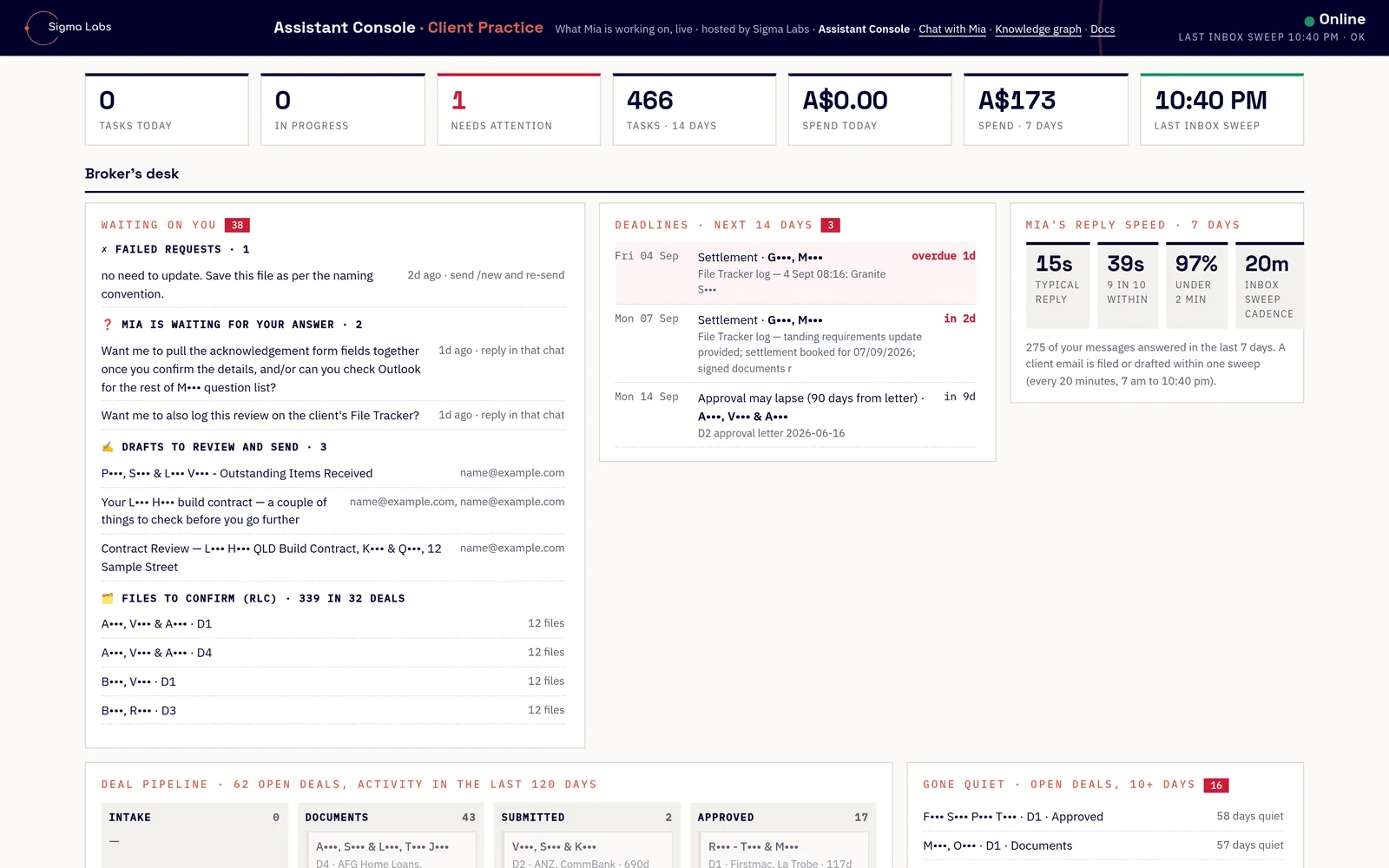
The assistant console, redacted. Broker's desk, waiting-on-you queue, deadlines, reply speed and deal pipeline, refreshed every 10 seconds without using assistant tokens.
Six jobs, nine agents. Each one scoped, approved and measured.
Approximately 24,000 existing files migrated and reclassified.
Documents are classified using their content rather than trusting historical filenames. New incoming documents follow the same process automatically. The naming standard is enforced by the platform at the moment of filing: a name that breaks it is rejected before it lands, and anything the classifier is unsure of is filed under its best name with a review tag, never silently misfiled.
- Identify the document type from its content
- Extract useful metadata (names, dates, amounts, references)
- Associate the document with the correct client and deal
- Detect duplicates and near-duplicates
- Name it with a consistent, deal-anchored convention
- Store it in the correct library and folder
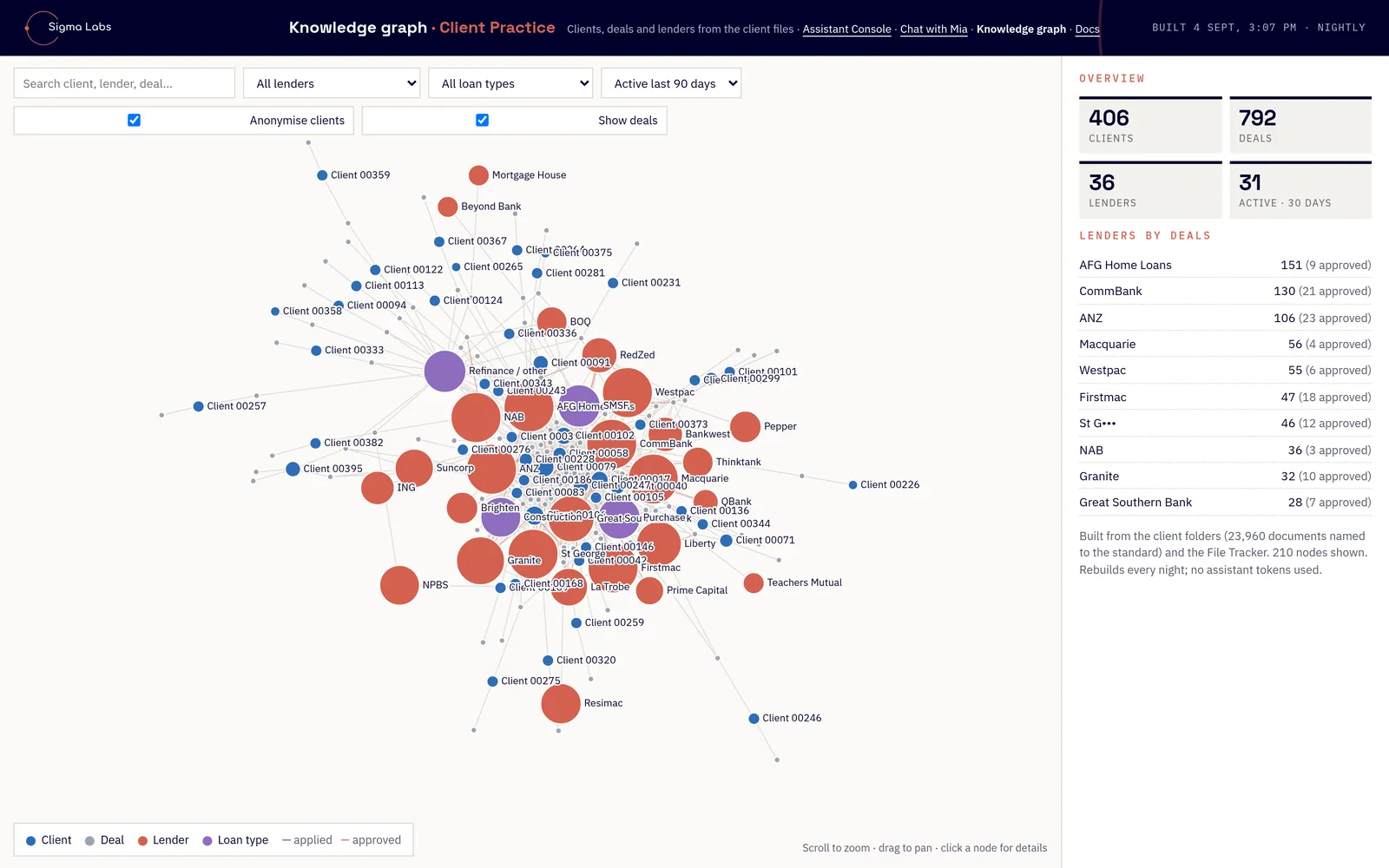
Knowledge graph rebuilt nightly from the filed documents (23,960 named to the standard) and the File Tracker: 406 clients, 792 deals, 36 lenders. Clients anonymised.
The inbox, swept and summarised.
Mia reads the mailbox the way an experienced assistant would, then hands a person the decision.
- Sweeps the inbox every 20 minutes from 7 am to 10:40 pm, each sweep costing about 30 cents
- Identifies messages that need attention
- Summarises important correspondence
- Searches historic email across folders
- Locates client and lender correspondence for a deal
- Drafts replies for human approval before anything is sent
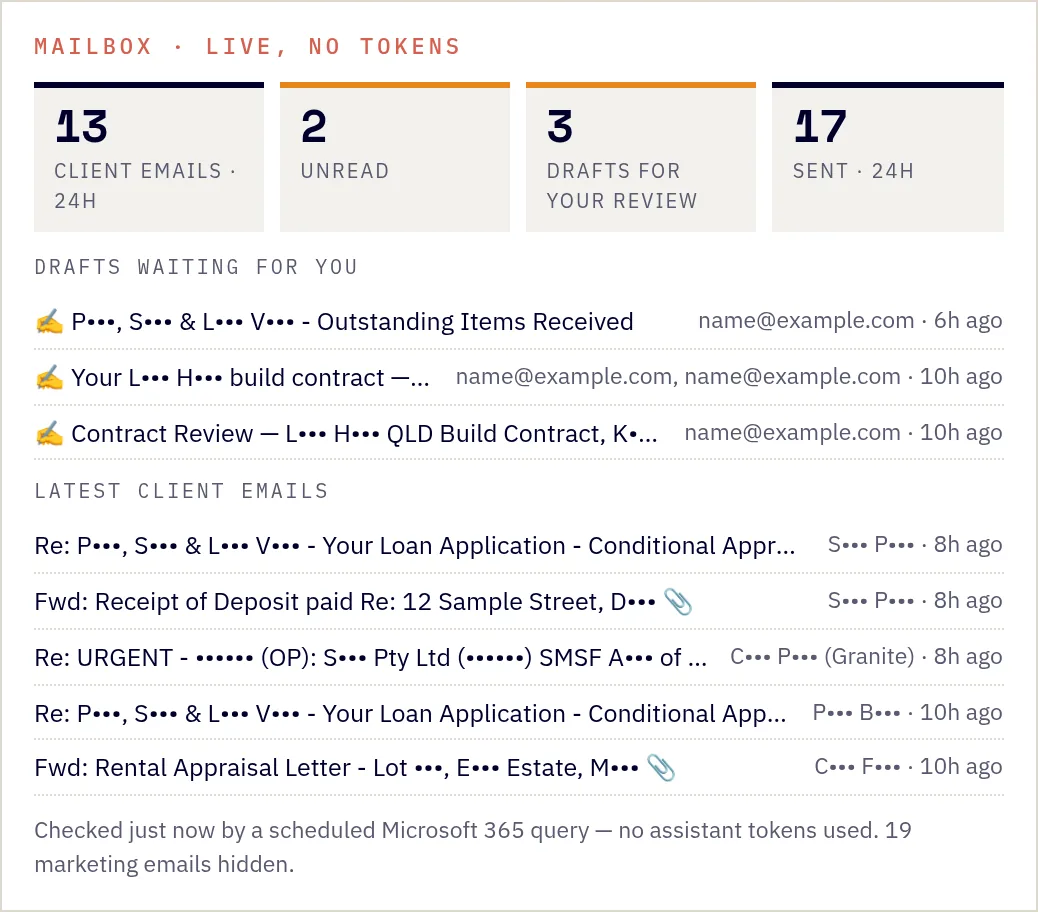
Mailbox panel checked by a scheduled Microsoft 365 query, with drafts waiting for the broker. No assistant tokens used.
Land and building contracts, checked against the broker's own list.
Mia reads the whole contract, every page, and reviews it against a checklist the broker owns. A 49-page building contract or a 149-page land contract takes minutes. Every review states exactly how many pages were read, so a partial read can never pass as a full one.
The review leads with a safeguard scan for the things that cost buyers money after they sign: nominated-builder covenants, build deadlines, developer buy-back rights, resale bans, sunset clauses, and progress-payment schedules that do not line up with the lender's drawdowns. It knows the difference between a normal SMSF purchase structure and a real entity mismatch, and it carries the cooling-off and disclosure rules for each state.
- The reviewFor the broker: pre-signing alerts, key terms, red flags, a finance and settlement lens, funds to complete and an action list, on the practice's letterhead as a PDF.
- The client brief"What you're getting into": one page in plain English the broker can send to the client, covering the money beyond the price, the builder, the deadlines, the gaps to close and the questions to ask.
- The feedback emailOn request, drafted for the broker to send.
The checklist belongs to the broker, not the model. Findings are a review aid, not legal advice, and every review tells the client to have their solicitor or conveyancer confirm each point before signing or before cooling-off ends. The broker reads, decides and sends.
On one land contract the obligation to build with a nominated builder was not in the contract of sale at all. It sat in the housing covenants on page 56. Mia found it, quoted the clause numbers, and listed the pages she had read in full against those she had only searched.
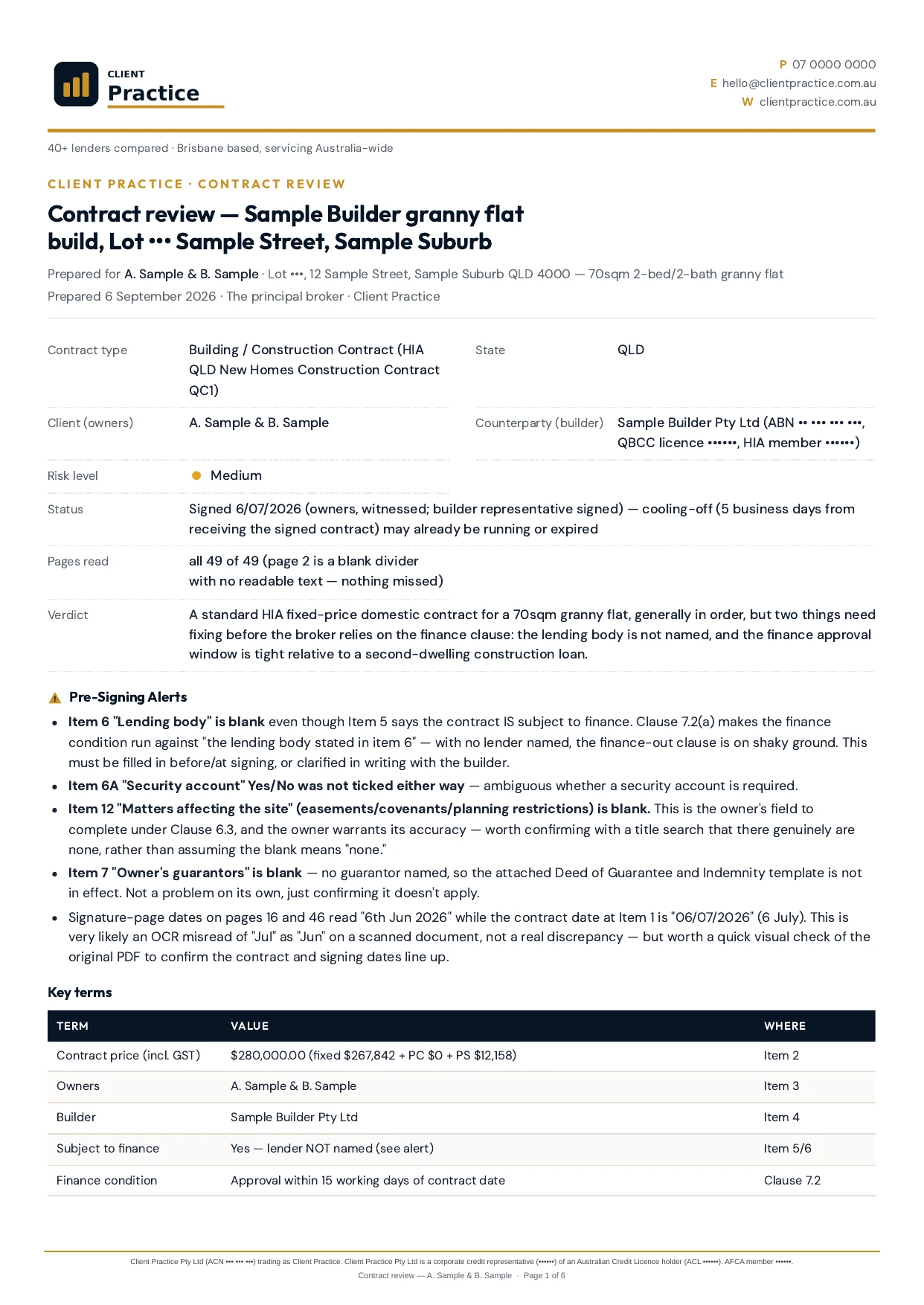
Page one of a review on the practice's letterhead: contract facts, pages read (all 49 of 49), verdict and pre-signing alerts. Names and addresses replaced.
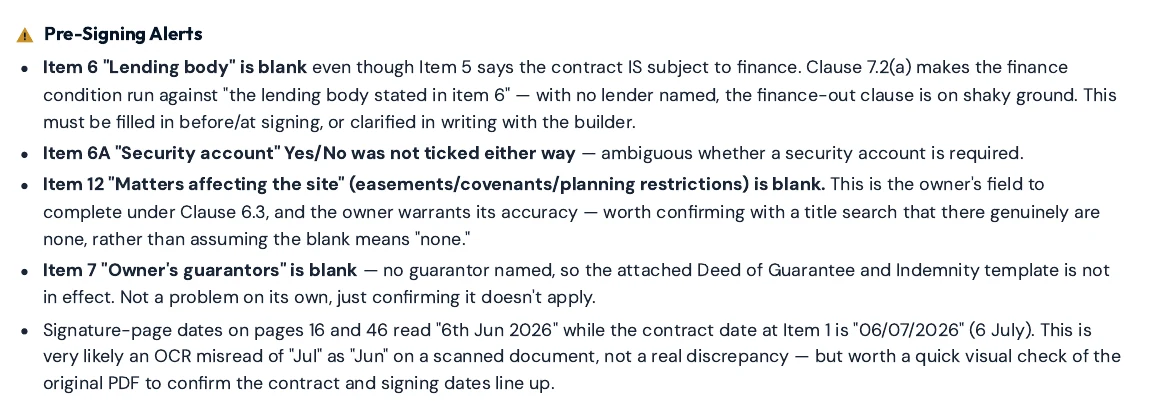
Pre-signing alerts: the items that must be fixed or confirmed before the client relies on the finance clause.
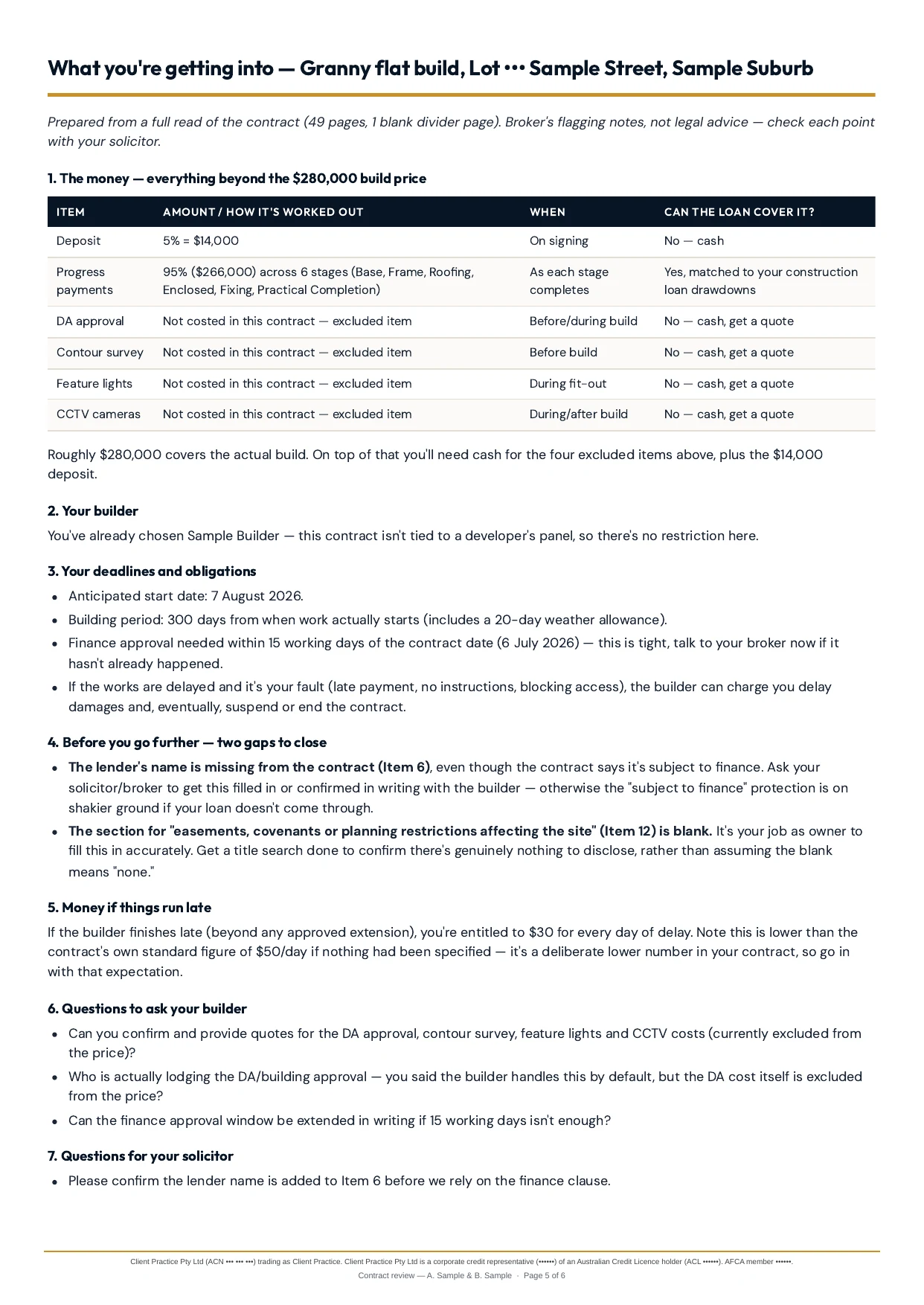
The client brief: one page the broker can send, covering the money beyond the price, deadlines, gaps to close and questions for the builder and solicitor.
A current internal lender-rate information source.
A scheduled agent maintains lender-rate information so the team is not repeating the same manual research every week.
Information is maintained as an internal reference the broker consults and verifies. It supports the broker's judgement; it does not replace lender confirmation.
The refresh runs every morning and currently tracks around 100 products across 17 lenders, at about 26 US cents a run.
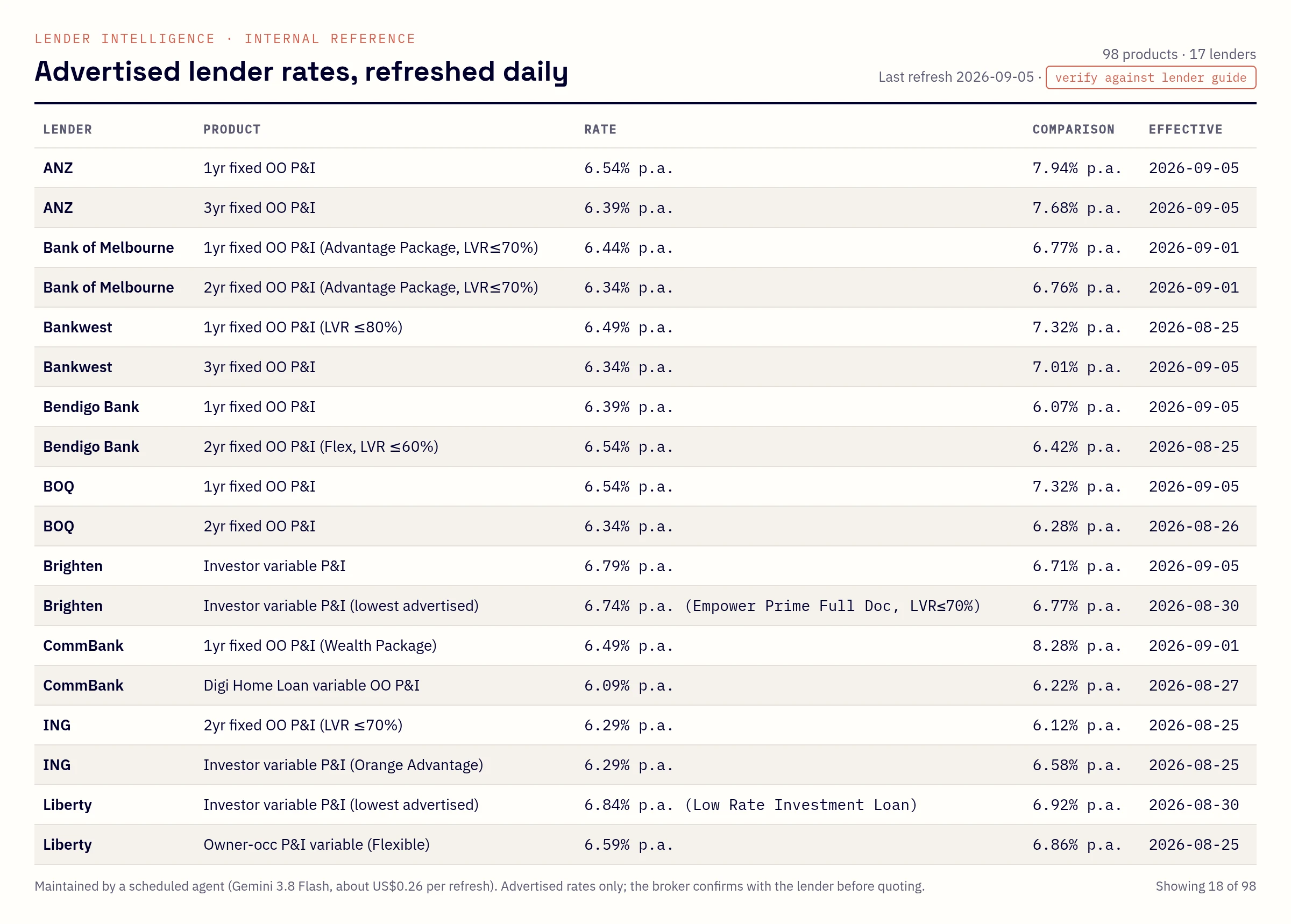
The internal rates reference, refreshed daily by a scheduled agent. Advertised rates only; the broker confirms with the lender before quoting.
Operational reports on demand.
Questions the practice used to answer by hand, or not at all.
- Pipeline activity
- Clients who did not proceed
- Inactive clients
- Refinance-review opportunities
- Client engagement and activity
- Operational follow-up opportunities
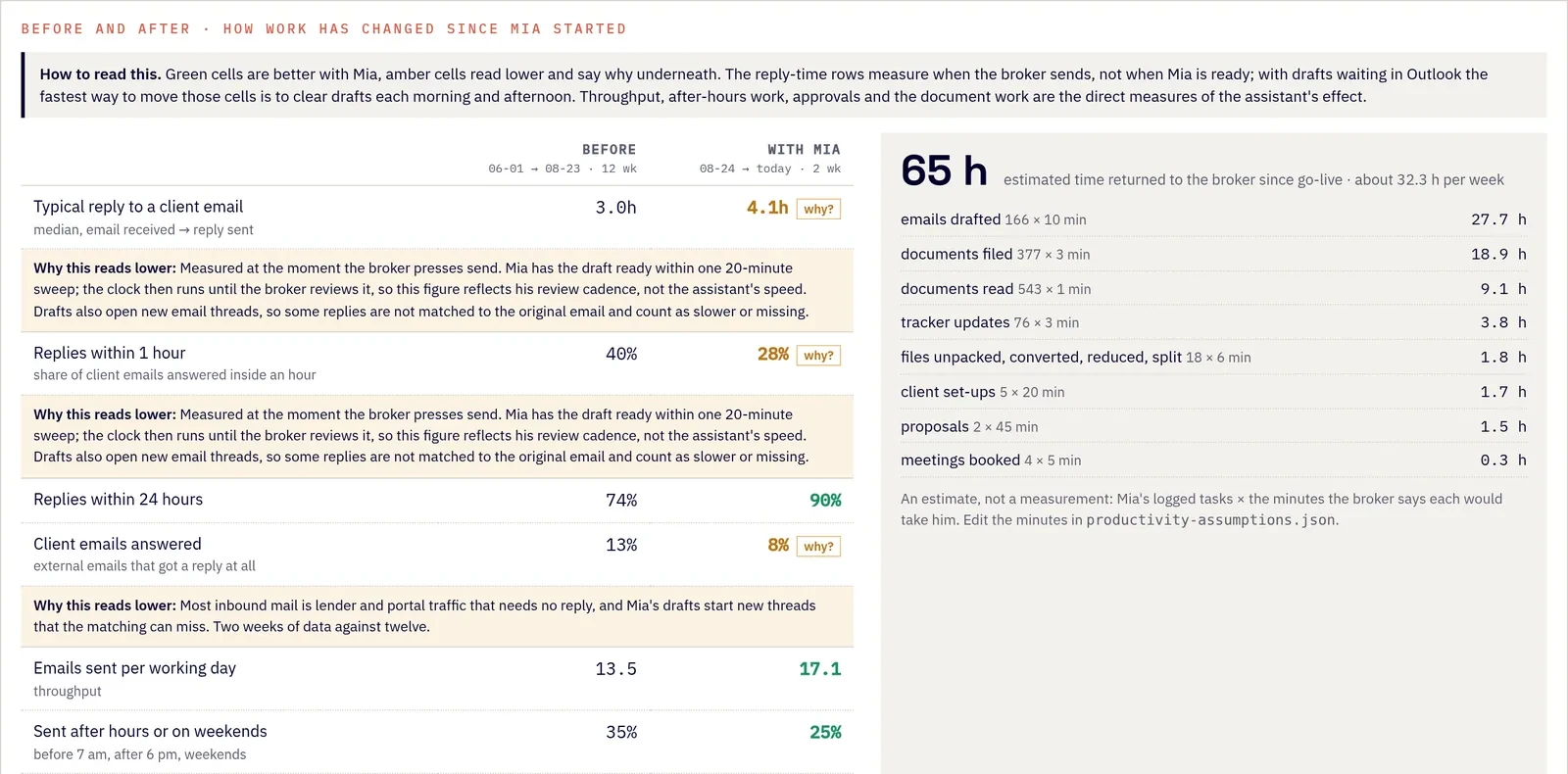
Before-and-after report from the practice mailbox. Cells that read lower say why, and the hours-returned figure shows its assumptions.
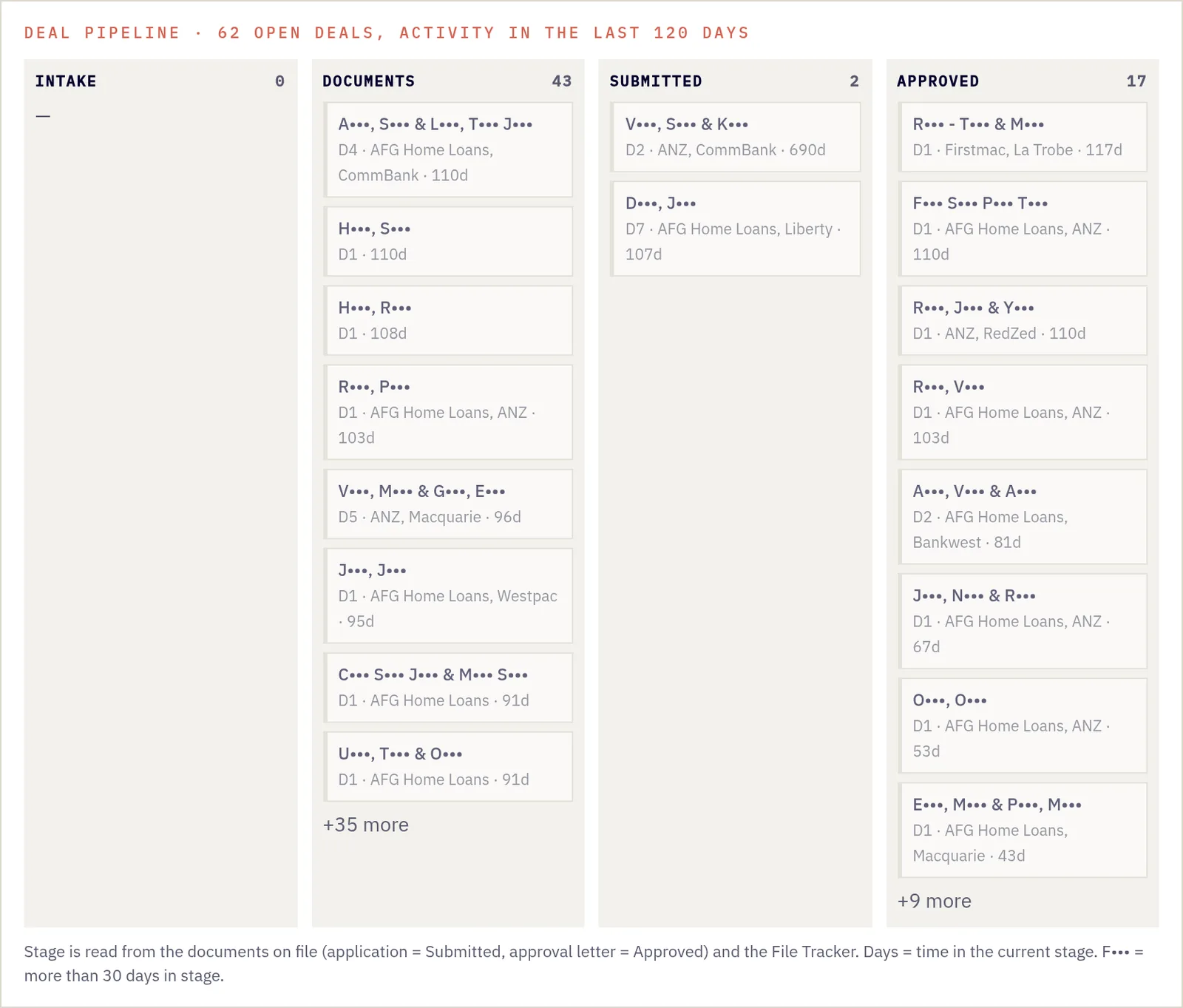
Deal pipeline read from the documents on file and the File Tracker, with days in stage.
What is running, what it costs and what is waiting on a person.
A live console makes the operations layer observable instead of mysterious.
- Tasks currently running and their status
- Agent activity
- Approximate AI and model cost
- Errors and retries
- Completed tasks
- Approval gates waiting on human action
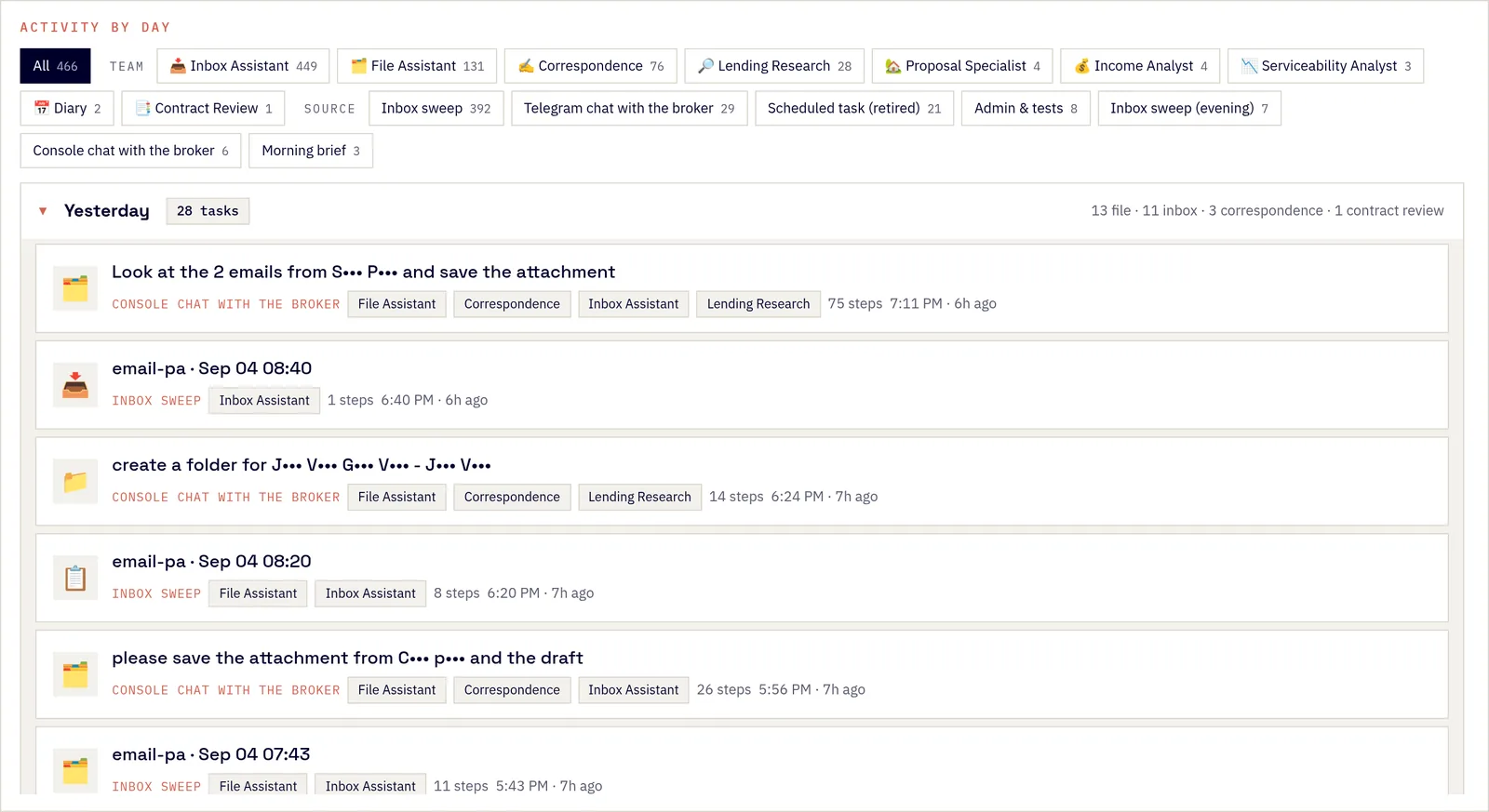
Activity by day, filtered by agent and source.
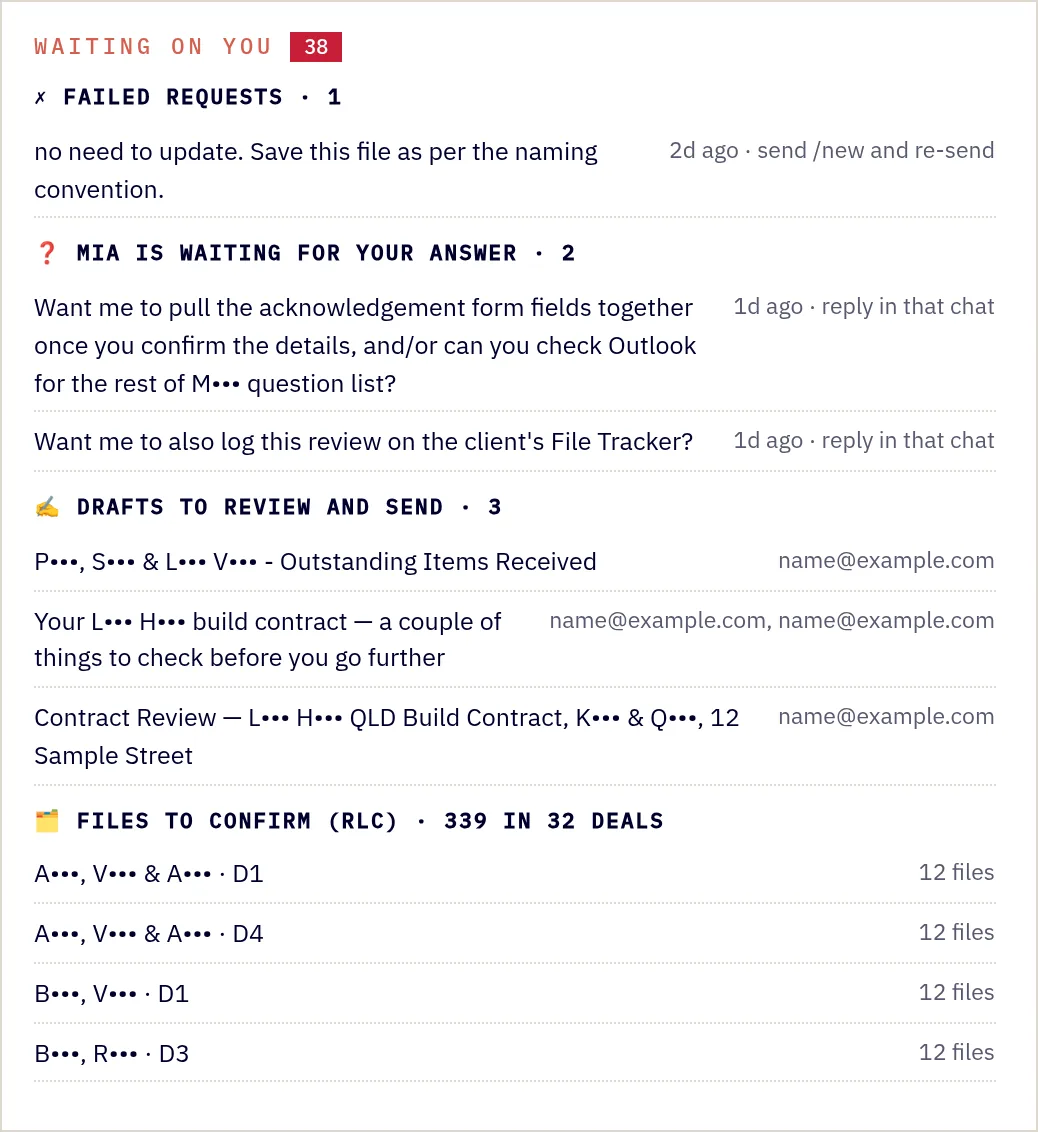
Waiting on you: failed requests, questions, drafts to send, files to confirm.
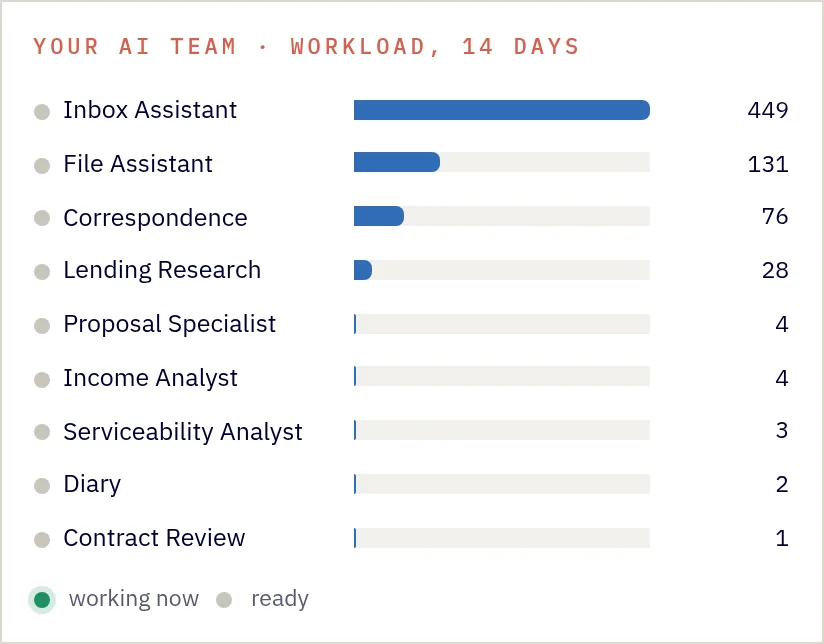
Nine specialist agents and their 14-day workload.
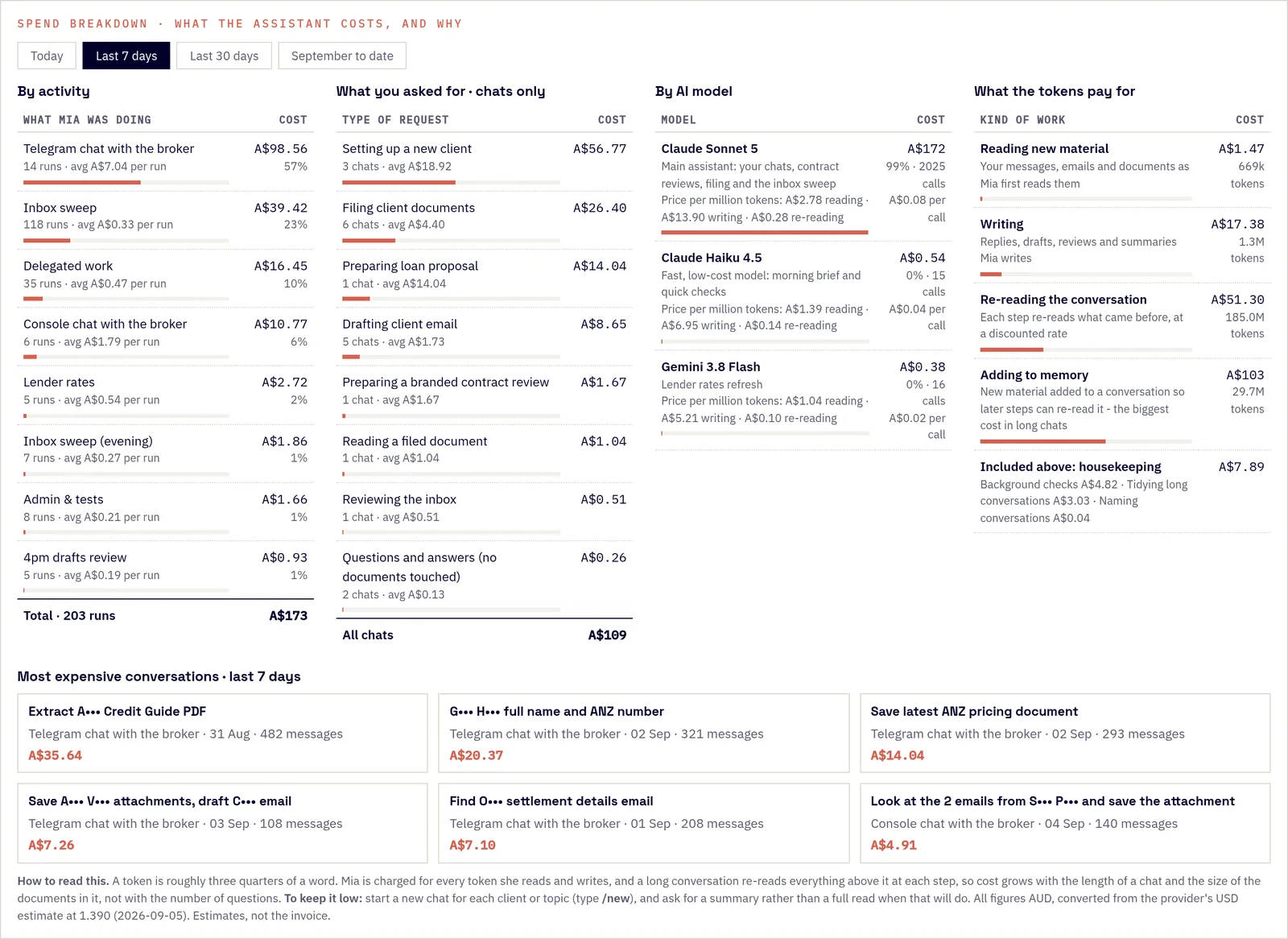
Spend by activity, request, model and kind of work, in AUD.
Mia does not make consequential decisions.
Mia is a human-in-the-loop system by architecture, not by policy. Sending an email, filing a document to a client record, issuing contract findings and any other action with a consequence for a client, lender or the practice waits for a person to review and approve it.
Approval gates are enforced in the workflow code and visible on the console. Lower-risk work such as classification, drafting, summarising and research runs ahead, so the person's time is spent on decisions rather than on preparation.
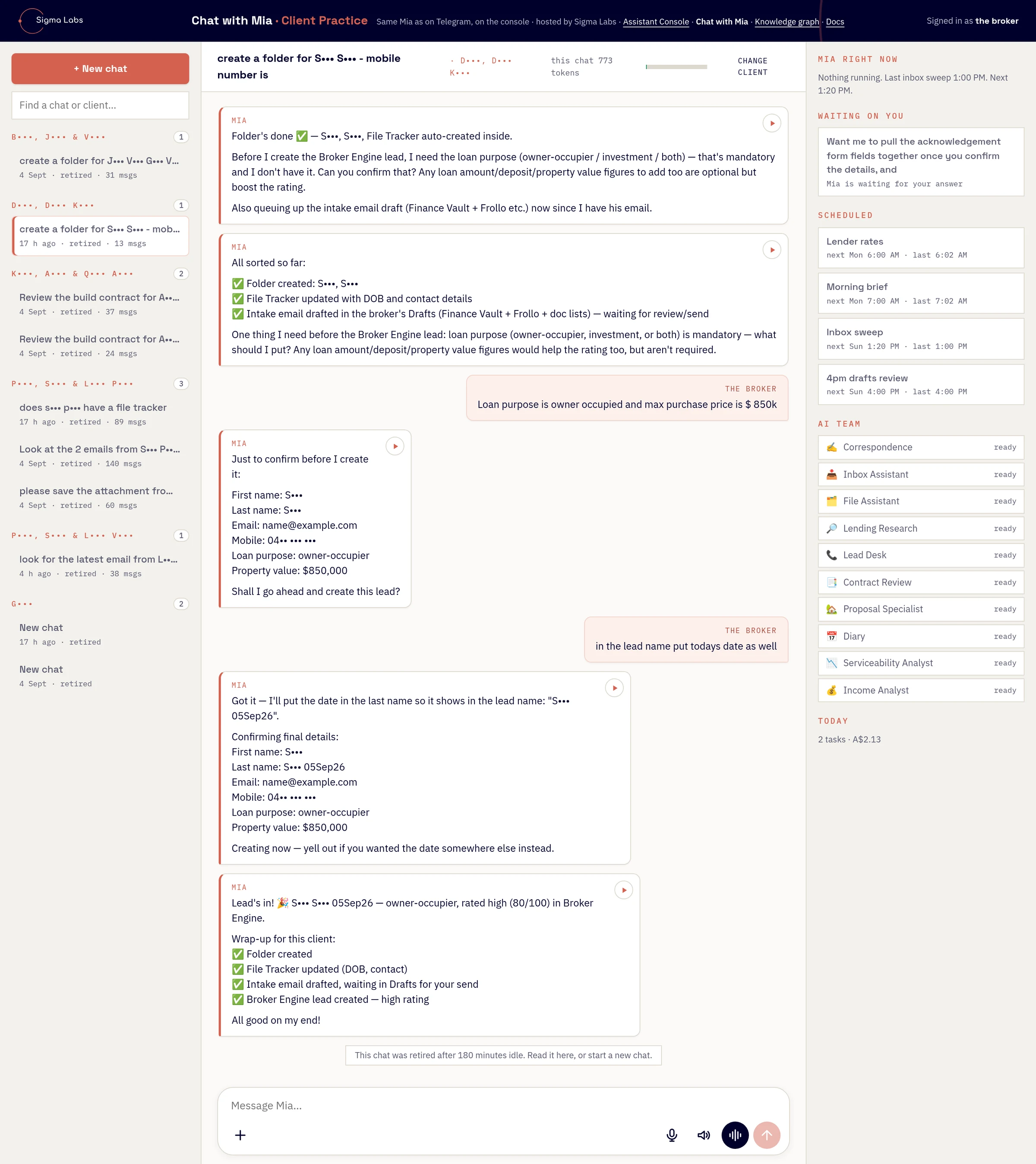
A new client in one conversation: folder, File Tracker and intake draft created, then Mia stops to confirm the lead details and asks for the one field she does not have before creating it. Names redacted.
If an action would be hard to undo, or would reach someone outside the practice, a person presses the button.
Built to be trusted
- Drafts, never sends. Every client-facing email, lead and new folder needs the broker's yes.
- Reads before it names. Filenames are never trusted; every document is classified from its content and mismatches are flagged.
- The filing standard is enforced, not requested. A file name that breaks the standard is rejected by the platform before it is saved, and a guard sweeps the whole library six times a day, repairs what it can and only alerts a person for what it cannot.
- Uncertain files are tagged for review rather than guessed.
- Nothing is overwritten or deleted. Client documents and records are stored only in the practice's own Microsoft 365 tenant; model processing is documented and controlled.
- Partial reads are disclosed. If a document was only partly read, the broker is told exactly which pages were missed.
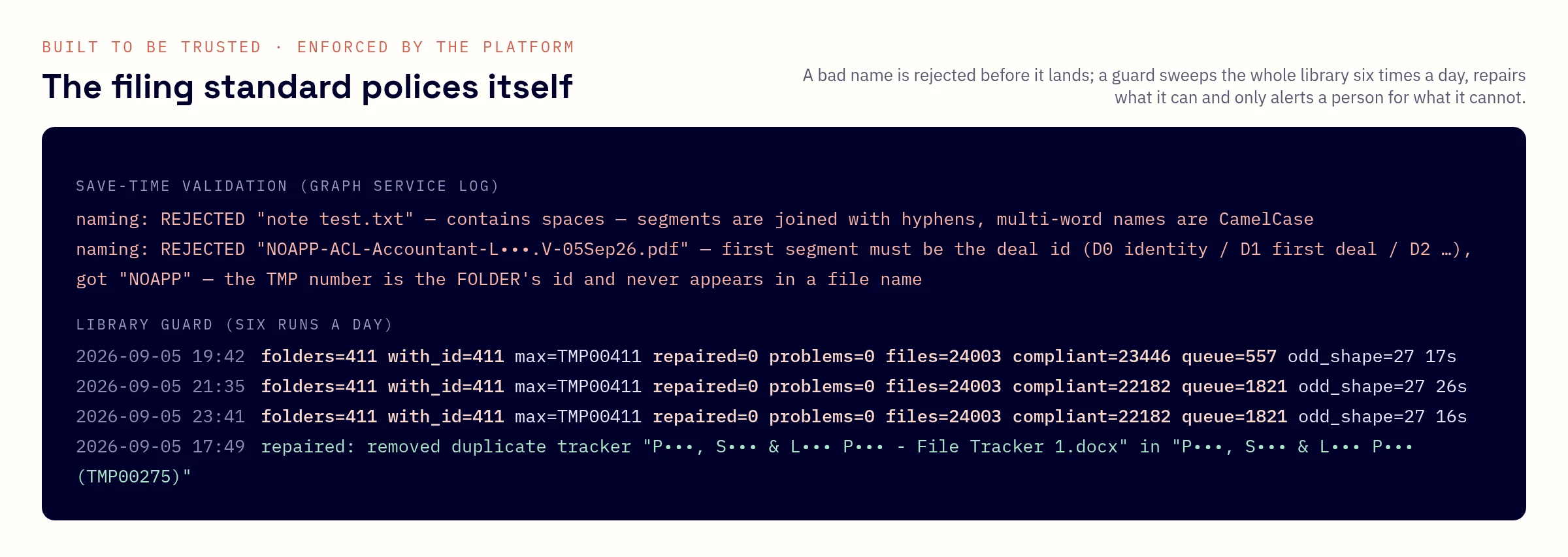
The filing standard polices itself: a rejected name with the reason, and the library guard's runs. Client names redacted.
Approximately 32 hours of admin time returned to the broker every week.
That is estimated from 64.7 hours counted in the first fortnight at agreed minutes per task, and comes to roughly 1,660 hours a year. We do not translate it into a dollar figure, because we have not measured one.
Before and after
Twelve weeks before Mia against her first fortnight, measured from the practice mailbox.
| Measure | Before | With Mia | Change |
|---|---|---|---|
| Emails sent per working day | 13.5 | 17.1 | +27% |
| Email sent after hours or on weekends | 35% | 25% | −10 pts |
| Client emails answered within 24 hours | 74% | 90% | +16 pts |
The first 11 days
What Mia actually did, counted from her own activity log.
Also delivered: 76 File Tracker updates, 5 new client files set up, 2 branded loan proposals and 5 full contract reviews. AI running cost under A$1,000 a month, roughly one day of PA time per week.
Figures as at 5 September 2026, taken from the assistant's own activity log and the practice mailbox. Hours returned are estimated from counted tasks at agreed minutes per task. Client and broker details withheld.
Acquisition and operations, converging on the broker.
The public platform and the private operations layer are two flows into the same person. Nothing on either side commits to a client, a lender or the practice without the broker.
One operations layer. Knowledge, actions, interfaces, and a person in the loop.
Mia sits over the practice's knowledge and actions and exposes them through the interfaces the team already uses. Orchestration routes each request to document intelligence, an agent or a model, then stops at a human approval gate before anything consequential happens. Everything is audited and costed.
- LayerMia — private AI operations layerThe single assistant the team talks to.
- KnowledgeSharePoint · Documents · Client data · EmailsInside the customer's Microsoft 365 environment, with scoped access.
- ActionsEmail · Filing · Reports · ResearchWhat Mia can do in those systems.
- InterfacesWeb console · Messaging · Morning brief · DashboardHow the team reaches Mia.
- RoutingAI orchestrationSends each request to document intelligence, an agent or a model.
- ComponentsDocument intelligence · Agents · ModelsSpecialised, scheduled and selected per task.
- GateHuman approvalConsequential actions wait for a person.
- ControlAudit · Cost · ObservabilityEvery task logged, costed and visible on the console.
Document-heavy, regulated and short on time?
The same architecture applies to brokers, advisers, accountants, conveyancers and law firms. Tell us what is consuming your team's week.